
How I Saved $63 By Switching From PostCron To SocialPilot?
Everyone who is looking forward to gaining readers involves in social media marketing!
Along with Facebook and Twitter, there are plenty of other social networks that are great for social promotions like Pinterest, Linkedin, VK, etc.

Now, if you are thinking – Why I should do content promotion on various social media profiles?
My answer to you based on Google Trends is –
Apart from popular networks people in different countries prefer different social networks!
Now in order to cover a wide audience, you need to hook up with their preferred networks.
Check the Google Trends screenshot to know the stats yourself!

- But Wait! Are you thinking of promoting your blog posts manually on more than 10+ networks?
Not a good idea!
Promote your content smartly with few clicks on multiple social platforms.
- Share your blog content immediately or schedule it to post later on multiple social profiles with SocialPilot an excellent automated posting app which you can use from any browser.
Table of Contents
SocialPilot Free Trial – Best Social Media Management Platform
You now get a 14-day free trial on all the premium plans of SocialPilot. The Enterprise plan is custom made and so is excluded from the free trial.
In addition to this, no credit card details is required and you can upgrade or cancel your plan based on your needs.
How To Use SocialPilot Dashboard?
Getting started is really simple and easy where SocialPilot provides very clean, easy to use and user-friendly dashboard.
I will help you send your first post by covering all the necessary points mentioned below –
1. How to Connect Social Media Profiles?
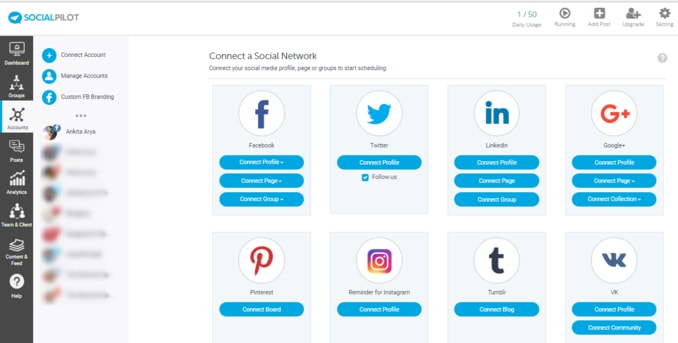
The very first step is to connect all your social media profiles, groups, and pages with SocialPilot.
Social accounts covered by SocialPilot includes –
- Facebook,
- Twitter,
- Linkedin,
- Google+,
- Pinterest,
- Instagram,
- Tumblr,
- Vk,
- and Xing.
2. How to Schedule your Posts?
Select desired date & time from the table and click on Set Schedule button and schedule your posts at the time that performs best for you!
Don’t forget to adjust the time zone by setting up Change Timezone option from the Setting link present in Header menu.

3. How to Create a Post?
Create your first post and add it to scheduling queue. Alternatively, you can choose to either share it right away or schedule at a specific time through the dropdown of Add to Queue button.

Create your content. You can either choose to write a simple text or a text with an image by selecting Share as Text or Share as Image option.
After this select the social accounts where you want to share the post from the right-hand side panel. You are all set to deliver your first post!
4. How to Schedule Video using SocialPilot?
SocialPilot has launched one of the most awaited features – Video Posting(in Beta).

Video posting feature allows you to –
- upload and schedule videos posts for multiple social media networks.
- If the video size is bigger or if the network doesn’t support video uploads at all (Xing, Pinterest, Tumblr)..
..the video is uploaded on SocialPilot’s servers, and a link to the video is shared in your post.
Video feature is available for all premium plans including –
- Basic, Growth Hacker and Business Plans.
How I saved $63 While Making A Switch From PostCron To SocialPilot?
UPDATE – The pricing plans of SocialPilot has been revised. Kindly don’t compare this amount with the latest pricing. I saved $63 according to their old pricing plan!
There are many popular social media automation apps then what made SocialPilot a better choice?
Every service offers premium plans, similarly, I was paying $83.33 to PostCron for 100 social accounts that don’t even include analytics!!
But SocialPilot features a minimal or low monthly cost of $20 for 100 profiles including social media analytics.
And this is how I saved $63!!
Apart from pricing the SocialPilot scheduling tool is equipped with all necessary features that any blog owners, online entrepreneurs, businesses, and bloggers seek for!!
SocialPilot Download Options –
There are three ways you can download SocialPilot tool and schedule on the GO.
Schedule your posts and tweets for all your social accounts through –
- Browser Extension: Publish any article or post that you find interesting right from your browser without opening SocialPilot
- Mobile app for iOS and Android: Found something interesting while surfing from your phone? Share the post or tweet right from your phone or create new content by using SocialPilot’s awesome mobile apps.
SocialPilot Plan and Pricing Details –
The tool features three pricing plans.
The minimum plan starts at $10/month for the Individual plan. Where you can connect 10 social media accounts, publish 50 posts and discover curated content within the SocialPilot dashboard.

Some Extra Shots About SocialPilot!
1. URL Shorteners that SocialPilot Supports –
SocialPilot supports four types of URL or Link Shorteners services. They are –
- Google (Goo.gl), Bitly, Sniply, and Rebrandly.
2. Analytics –
Analyze your social accounts completely even if you have not scheduled your post from SocialPilot.
Social media analytics accounts covered by SocialPilot are Facebook, Twitter, Pinterest, and Linkedin.
3. How Can you Share your WordPress Blog Posts with SocialPilot?
There are two ways to share your WordPress blog posts with SocialPilot –
- You can use your Zapier integration.
- Or use RSS Feed automation feature.
4. Find Shareable Content –
If you are out of the content ideas, there is no need to worry as you can make use of SocialPilot content discovery in order to discover interesting stories to share on your network.
And in this way, you will always have something interesting to share on your social media channel.

5. How Can you Use Bulk Scheduling?
Bulk scheduling with SocialPilot is a 3-step process: Upload, Preview, and Select accounts.
In order to do so, you need to upload a CSV file containing details like Post content, URL, Date and Time for bulk schedule.
Here is the attached Sample CSV file if you want to know the format.
Conclusion
Do let me know – Which social media scheduling tool are you using for your blog?
If you are an existing user of the SocialPilot, I would love to hear your review & feedback in the comments below.
And since this a social automated posting app, a little social media love is appreciated. Share this SocialPilot review with your blogger friends on Facebook, Twitter, and Google+!! 🙂


Oh man this is so robust! I am actually in the market for auto sharing!
Thanks for sharing this. I have just started my blog and being new to the blogging world and had no idea about it!
Signing in right away as it worth to schedule everything in one place.
This is what I’ve been looking for! It has everything I need + analytics!
Thank you so much for sharing you made my day! x
I have been researching about social pilot after seeing a lot of people use it. I really need to schedule my posts and this really cost followers sometime.
What an excellent introduction to Social Pilot! It sounds like a fantastic timesaver too.
Going to try SocialPilot, seems so promising.
Well, you have a wonderful way to share content. 🙂
Thanks, Denay! Glad you liked the content.
I have been using SocialPilot to manage my social media accounts, and I am so much impressed with it!
I would recommend this to all.
I’m defo trying SocialPilot. You have enlightened me so much!
I always struggle with these type of services because the share previews seem to fail on FB and LinkedIn. Especially with FB I seem to have to use the FB debugger a lot lately to get any pictures up under links. Any issues with SocialPilot on those two platforms?
I totally agree with you, Gloria!
This is the problem I’ve faced earlier with PostCron and before going to the premium version of SocialPilot to gain the advanced benefits I’ve personally tried their free account.
Well, the tools post everything posts with included images/pictures and videos fine and on scheduled time!!
You must give it a try! Start with a Free Trial instead to explore the SocialPilot Dashboard. 🙂
Oh, this would be perfect for me to start posting more on platforms like Pinterest and Google +.
I am definitely going to try out SocialPilot!
Yes, SocialPilot is great when it comes to sharing your pins across multiple Pinterest boards as well as on various communities on Google Plus!
What a great tool for posting videos. I love how you can plug all your social media into it and stream to whichever one you want. I am signing up now as I’m constantly working with videos.
This sounds like it would really come in handy. I might have to try this out. I schedule more often in the summer.
Socialpilot sounds very useful. I would like to try it out asap. Thanks for sharing.
XOXO
I have really heard a lot about SocialPilot, I am surely going to give it a try this time!
I used coschedule before but stopped and now looking for something new and social pilot seems like a great option
This sounds like an awesome tool. I haven’t heard of it before and am definitely going to check it out. Thanks for sharing!
It’s my first time to hear about Social Pilot! I am gonna try this out because it seems to be doing wonders for a lot of bloggers.
Excellent blog post full of information about SocialPilot really eye-opening! Going to try my hand on it.
I am just starting with videos and I had not heard of Social Pilot. Thanks for sharing.
What a great tool! I definitely will try this!
It looks like a great tool! there are so many out there, we need to know which one works best for our particular needs.
Great information on SocialPilot. I will look into it. Thank you for sharing.
I haven’t heard of SocialPilot before but after reading this I’d be keen to give it a go! I love saving money!
Very cool, I’ve never heard of this tool before. Seems like there are a ton of great post scheduling options.
I am looking for more tools that I can use on my blog. I’ll be checking social Pilot for sure.
Socialpilot sound like a great social automated posting app. These app sounds amazing and has so many different social media that you can schedule in to build a more variety of customers.
Wow! This is my first time hearing about Social Pilot. It sounds like a really useful resource and tool for any blogger. Thanks for the great information!
Yes, I got so frustrated with CoSchedule that I found & switched to SocialPilot & glad I did although I’m not an expert yet, it’s pretty easy to use.
True that, Tina! 🙂
I’m pretty new to blogging, so I’m glad to have come across this post!
after all 63$ is still some money!
No idea where you get those prices from but they are totally wrong. They dont even have an account called Growth Hacker.
Hey Paulo, Thanks for stopping by!
Earlier, Growth Hacker was one of the Socialpilot pricing plans! But the tool has revised its pricing also it has stopped offering the Free Plan rather now it gives a 14-day free Trial on all premium plans.
Thanks for notifying me! I’ve updated the post. 🙂